
How to Start With Astrophotography
story by Orion Phillips
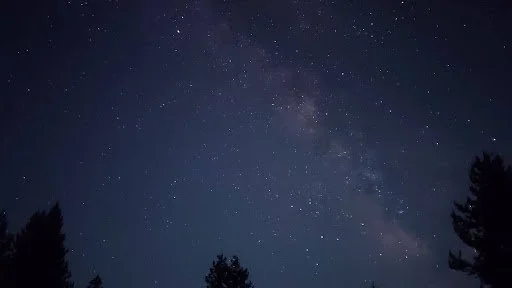
“Milky Way” Orion Phillips 2024 with the Samsung A71. ISO 3200, 10 Second exposure, WB 4200K
Getting Started in Astrophotography
Many people think you need fancy equipment to get started with astrophotography, but that’s simply not true. I got started with my smartphone.
And it wasn’t even a nice smartphone.
Don’t be tempted to go buy fancy equipment – it doesn’t make sense for a complete beginner to buy a $399 beginner telescope.
I started on a Samsung Galaxy A71. I used my default camera app. I got photos that wouldn’t win me an astrophotography contest, but they did earn words of awe from my friends.
All you need is a camera with adjustable photo settings, a tripod, and an editing app (which can simply be your phone’s gallery app). And maybe a cloudless night sky away from city lights.
While not the darkest night sky, Ellensburg is a great place to start your astrophotography journey. Away from major city lights, you can see many different stars and constellations. Find a spot on campus away from streetlights where you can see the sky without a building being in your way, and you’ve already completed the first step (finding a location).
Now, how exactly do you use your phone to picture the stars? You can use your phone's night mode to capture a basic photo, or you can get more advanced with manual photo settings.
Now let’s explore what each of those settings means.
ISO is how bright a photo will be; lower ISO creates a darker photo, and higher ISO makes it brighter.
The speed is how long the camera takes to take a photo, and therefore how much light it captures (important for capturing the stars, and also why you should use a tripod to keep the photo steady).
Focus allows you to choose whether to use auto or manual.
And finally, WB adjusts the picture's color temperature.
My go-to starting settings are 1600 ISO, 10 Second Exposure/Speed, Manual focus, and 5000K WB.
The best way to learn is to play with each of these settings and notice the changes between photos.
Want to learn about some more stars, constellations, and even planets? You can download a star-finder app (I love Stellarium) that lets you point your phone at the sky and tell you exactly what you are looking at.
Finally, CWU’s astronomy club is a great place to connect with people who are interested in space and will gladly look at your photos. (And if you attend meetings, you have the chance to go on the roof of Discovery and get that much closer to the stars.)
Now, with each of these tips, go out and become an astrophotographer!